> For the complete documentation index, see [llms.txt](https://examind.gitbook.io/v1/llms.txt). Markdown versions of documentation pages are available by appending `.md` to page URLs; this page is available as [Markdown](https://examind.gitbook.io/v1/examind-platform/build/question-builder/dynamic-questions/dynamic-engine/variables.md).
# Variables
This article shows you how to use the Variable blocks in our Dynamic Engine.
## What Is a Variable?
The term *variable* is the same term used in mathematics or computer science. It is a named value that can be changed - aka it "varies".
## The Variable Blocks
There are three kinds of variable blocks that you can use:
1. Set
2. Get
3. Change
### Variable: Set
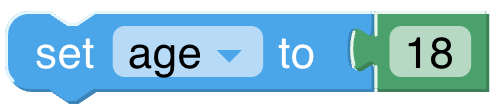
The **set** block assigns a value to a variable, creating the variable if it doesn't already exist. For example, this sets the value of the variable named "age" to the number "18".
### Variable: Get
The **get** block provides the value of a variable. Continuing from the previous example, it would *get* the number "18".
{% hint style="info" %}
Without a corresponding **set** block, the engine does not know what you want to do with the number "18". Think of it like a floating puzzle piece that needs to be connected to something. Without a connection, it's just floating around the office looking for a fresh cup of coffee (like our hipster UX designer).
{% endhint %}
### Variable: Change
The **change** block adds a number to a variable. Continuing from the previous example, this would add the number "1" to the number "18".
The **change** block broken down into a calculation would look like this:
This is the equivalent of saying **set** the variable age to it's previous number (ie. 18) plus the number 1. So think of **change** like a shortcut.
### Variable: Menu
Click on the variable's dropdown symbol (light blue triangle) to get the following menu:
The menu provides the following options:
* **Existing variables**: The names of all existing variables defined in the program. In this example, we only have one variable (age).
* **Rename variable...:** Change the name of the selected variable. Selecting this option opens a prompt to enter a new name.
* **Delete the 'selected' variable:** Deletes all blocks that reference this variable wherever it appears in the program.
***
## Example Question
Consider the following multiple-choice question. The goal of this question is to add randomness to the "too young" and "too old" distractors.
Here is what the Dynamic Engine would look like:
Age is being **set** to make the correct answer "18" and the other answer options set to *Math* blocks that randomly choose numbers in a range.
Here is what a sample question would look like (values highlighted in blue for convenience):